
Insurance Brokerage Management Software
Complete Client, Policy & Claims Management
MS Flex Insurance Brokerage Software delivers instant access to all client, policy, and claims information through a single, intuitive interface, making it one of the leading client management solutions in the industry.
View both active and inactive policies, track claims, manage renewals, and access supporting documentation without the need to switch screens.
- Centralised client records
- Efficient policy and claims management
- Advanced search capabilities
- Built-in filters and grouping
- Real-time portfolio visibility
Powerful search and filtering tools within our insurance brokerage software allow users to locate clients, policies, and claims quickly and accurately. This translates to less time searching and more time servicing.
- Sophisticated client searches
- Dynamic filtering and sorting
- Active and inactive policy views
- Claims tracking and management
- Instant access to related documents and communications
Your Entire Book of Business at Your Fingertips
MS Flex provides brokers with a complete view of every client relationship, encompassing active policies, claims, as well as historical records, communications, and documents, all through an integrated policy management system.
Advanced search tools and intelligent filters help users uncover exactly what they need, right when they need it.
Tailored for busy insurance professionals, MS Flex combines client management, policy administration, and claims tracking within a single, integrated platform. Users can conduct sophisticated searches across thousands of records, utilise built-in filters to refine results instantly, and access all related information from one central location.
Whether you're managing renewals, servicing clients, or reviewing claims activity, the information you need is always just a few clicks away.

Document Automation and Mail Merge.
Save time. Reduce errors. Improve communication.
MS Flex Insurance Brokerage Software delivers instant access to all client, policy, and claims information through a single, intuitive interface, making it one of the leading client management solutions in the industry.
View both active and inactive policies, track claims, manage renewals, and access supporting documentation without the need to switch screens.
- Centralised client records
- Efficient policy and claims management
- Advanced search capabilities
- Built-in filters and grouping
- Real-time portfolio visibility
Powerful search and filtering tools within our insurance brokerage software allow users to locate clients, policies, and claims quickly and accurately. This translates to less time searching and more time servicing.
- Sophisticated client searches
- Dynamic filtering and sorting
- Active and inactive policy views
- Claims tracking and management
- Instant access to related documents and communications
Your Entire Book of Business at Your Fingertips
MS Flex provides brokers with a complete view of every client relationship, encompassing active policies, claims, as well as historical records, communications, and documents, all through an integrated policy management system.
Advanced search tools and intelligent filters help users uncover exactly what they need, right when they need it.
Tailored for busy insurance professionals, MS Flex combines client management, policy administration, and claims tracking within a single, integrated platform. Users can conduct sophisticated searches across thousands of records, utilise built-in filters to refine results instantly, and access all related information from one central location.
Whether you're managing renewals, servicing clients, or reviewing claims activity, the information you need is always just a few clicks away.

Add Processes (Tracks and Items)
Improved compliance and accountability
MS Flex Insurance Brokerage Software delivers instant access to all client, policy, and claims information through a single, intuitive interface, making it one of the leading client management solutions in the industry.
View both active and inactive policies, track claims, manage renewals, and access supporting documentation without the need to switch screens.
- Centralised client records
- Efficient policy and claims management
- Advanced search capabilities
- Built-in filters and grouping
- Real-time portfolio visibility
Powerful search and filtering tools within our insurance brokerage software allow users to locate clients, policies, and claims quickly and accurately. This translates to less time searching and more time servicing.
- Sophisticated client searches
- Dynamic filtering and sorting
- Active and inactive policy views
- Claims tracking and management
- Instant access to related documents and communications
Your Entire Book of Business at Your Fingertips
MS Flex provides brokers with a complete view of every client relationship, encompassing active policies, claims, as well as historical records, communications, and documents, all through an integrated policy management system.
Advanced search tools and intelligent filters help users uncover exactly what they need, right when they need it.
Tailored for busy insurance professionals, MS Flex combines client management, policy administration, and claims tracking within a single, integrated platform. Users can conduct sophisticated searches across thousands of records, utilise built-in filters to refine results instantly, and access all related information from one central location.
Whether you're managing renewals, servicing clients, or reviewing claims activity, the information you need is always just a few clicks away.

Workflow Tracking
Track Every Step. Miss Nothing.
MS Flex Insurance Brokerage Software delivers instant access to all client, policy, and claims information through a single, intuitive interface, making it one of the leading client management solutions in the industry.
View both active and inactive policies, track claims, manage renewals, and access supporting documentation without the need to switch screens.
- Centralised client records
- Efficient policy and claims management
- Advanced search capabilities
- Built-in filters and grouping
- Real-time portfolio visibility
Powerful search and filtering tools within our insurance brokerage software allow users to locate clients, policies, and claims quickly and accurately. This translates to less time searching and more time servicing.
- Sophisticated client searches
- Dynamic filtering and sorting
- Active and inactive policy views
- Claims tracking and management
- Instant access to related documents and communications
Your Entire Book of Business at Your Fingertips
MS Flex provides brokers with a complete view of every client relationship, encompassing active policies, claims, as well as historical records, communications, and documents, all through an integrated policy management system.
Advanced search tools and intelligent filters help users uncover exactly what they need, right when they need it.
Tailored for busy insurance professionals, MS Flex combines client management, policy administration, and claims tracking within a single, integrated platform. Users can conduct sophisticated searches across thousands of records, utilise built-in filters to refine results instantly, and access all related information from one central location.
Whether you're managing renewals, servicing clients, or reviewing claims activity, the information you need is always just a few clicks away.
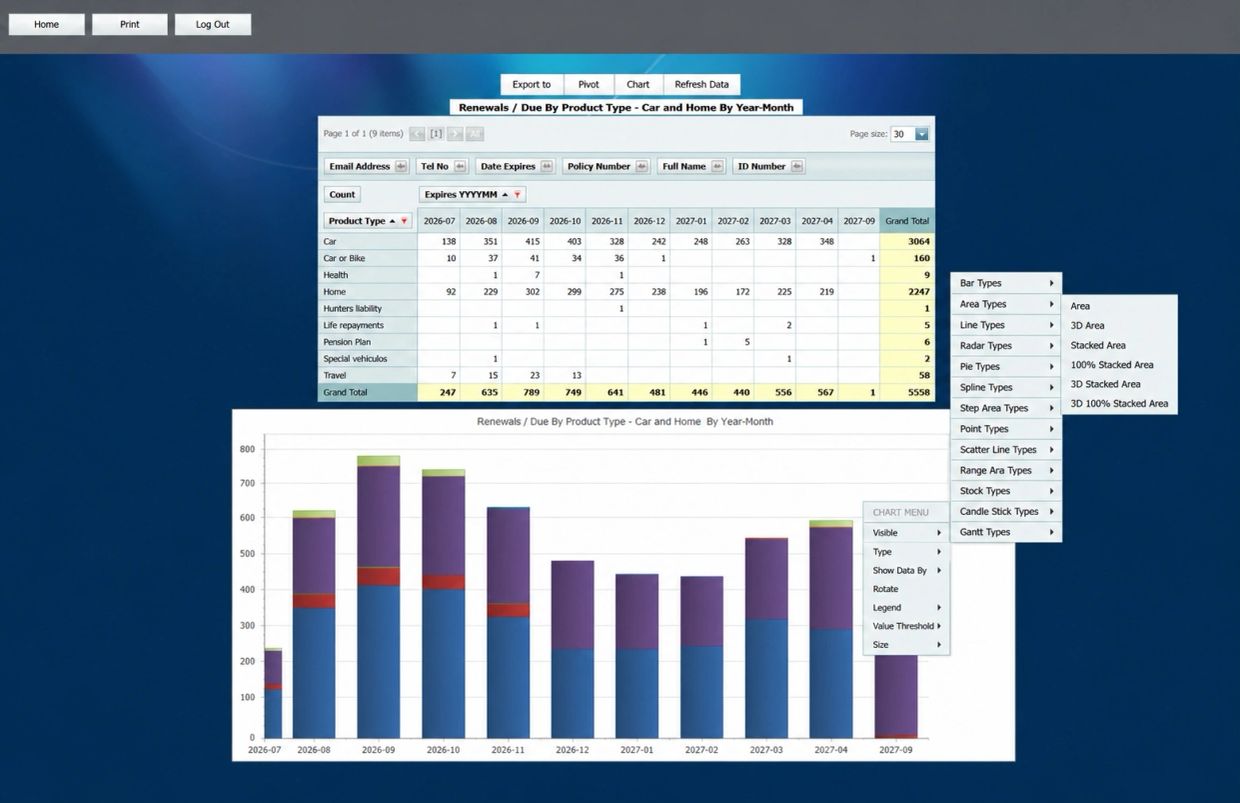
Reports (Renewals Due By Product Type)
Powerful reporting, dynamic dashboards and intelligent insights
MS Flex Insurance Brokerage Software delivers instant access to all client, policy, and claims information through a single, intuitive interface, making it one of the leading client management solutions in the industry.
View both active and inactive policies, track claims, manage renewals, and access supporting documentation without the need to switch screens.
- Centralised client records
- Efficient policy and claims management
- Advanced search capabilities
- Built-in filters and grouping
- Real-time portfolio visibility
Powerful search and filtering tools within our insurance brokerage software allow users to locate clients, policies, and claims quickly and accurately. This translates to less time searching and more time servicing.
- Sophisticated client searches
- Dynamic filtering and sorting
- Active and inactive policy views
- Claims tracking and management
- Instant access to related documents and communications
Your Entire Book of Business at Your Fingertips
MS Flex provides brokers with a complete view of every client relationship, encompassing active policies, claims, as well as historical records, communications, and documents, all through an integrated policy management system.
Advanced search tools and intelligent filters help users uncover exactly what they need, right when they need it.
Tailored for busy insurance professionals, MS Flex combines client management, policy administration, and claims tracking within a single, integrated platform. Users can conduct sophisticated searches across thousands of records, utilise built-in filters to refine results instantly, and access all related information from one central location.
Whether you're managing renewals, servicing clients, or reviewing claims activity, the information you need is always just a few clicks away.
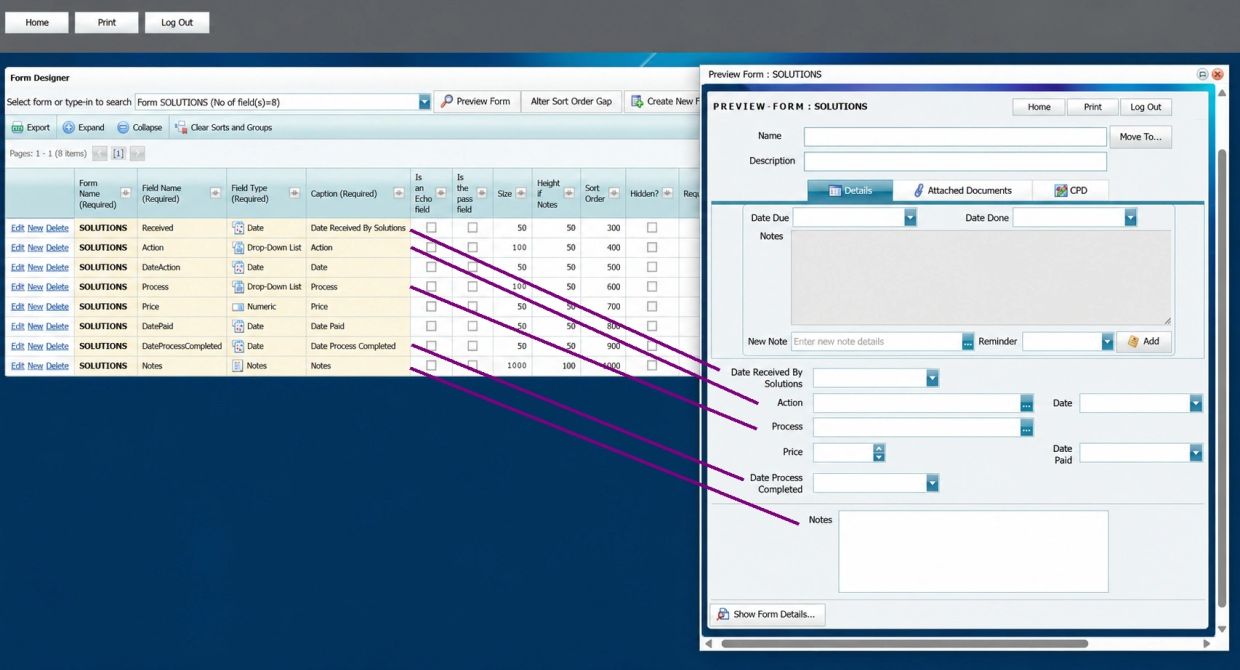
Form Designer
Enable flexible, simple form design to reflect your business needs
MS Flex Insurance Brokerage Software delivers instant access to all client, policy, and claims information through a single, intuitive interface, making it one of the leading client management solutions in the industry.
View both active and inactive policies, track claims, manage renewals, and access supporting documentation without the need to switch screens.
- Centralised client records
- Efficient policy and claims management
- Advanced search capabilities
- Built-in filters and grouping
- Real-time portfolio visibility
Powerful search and filtering tools within our insurance brokerage software allow users to locate clients, policies, and claims quickly and accurately. This translates to less time searching and more time servicing.
- Sophisticated client searches
- Dynamic filtering and sorting
- Active and inactive policy views
- Claims tracking and management
- Instant access to related documents and communications
Your Entire Book of Business at Your Fingertips
MS Flex provides brokers with a complete view of every client relationship, encompassing active policies, claims, as well as historical records, communications, and documents, all through an integrated policy management system.
Advanced search tools and intelligent filters help users uncover exactly what they need, right when they need it.
Tailored for busy insurance professionals, MS Flex combines client management, policy administration, and claims tracking within a single, integrated platform. Users can conduct sophisticated searches across thousands of records, utilise built-in filters to refine results instantly, and access all related information from one central location.
Whether you're managing renewals, servicing clients, or reviewing claims activity, the information you need is always just a few clicks away.
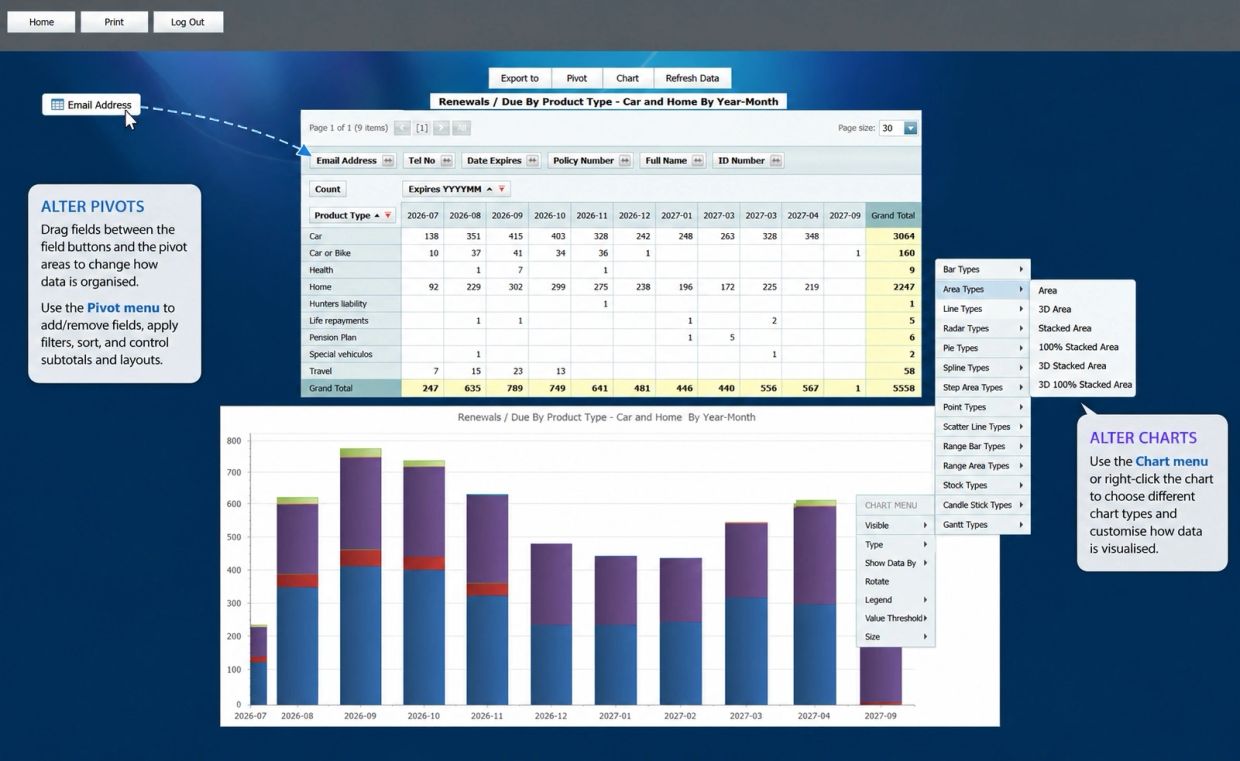
Report Designer
Transform operational data into meaningful business information
MS Flex Insurance Brokerage Software delivers instant access to all client, policy, and claims information through a single, intuitive interface, making it one of the leading client management solutions in the industry.
View both active and inactive policies, track claims, manage renewals, and access supporting documentation without the need to switch screens.
- Centralised client records
- Efficient policy and claims management
- Advanced search capabilities
- Built-in filters and grouping
- Real-time portfolio visibility
Powerful search and filtering tools within our insurance brokerage software allow users to locate clients, policies, and claims quickly and accurately. This translates to less time searching and more time servicing.
- Sophisticated client searches
- Dynamic filtering and sorting
- Active and inactive policy views
- Claims tracking and management
- Instant access to related documents and communications
Your Entire Book of Business at Your Fingertips
MS Flex provides brokers with a complete view of every client relationship, encompassing active policies, claims, as well as historical records, communications, and documents, all through an integrated policy management system.
Advanced search tools and intelligent filters help users uncover exactly what they need, right when they need it.
Tailored for busy insurance professionals, MS Flex combines client management, policy administration, and claims tracking within a single, integrated platform. Users can conduct sophisticated searches across thousands of records, utilise built-in filters to refine results instantly, and access all related information from one central location.
Whether you're managing renewals, servicing clients, or reviewing claims activity, the information you need is always just a few clicks away.
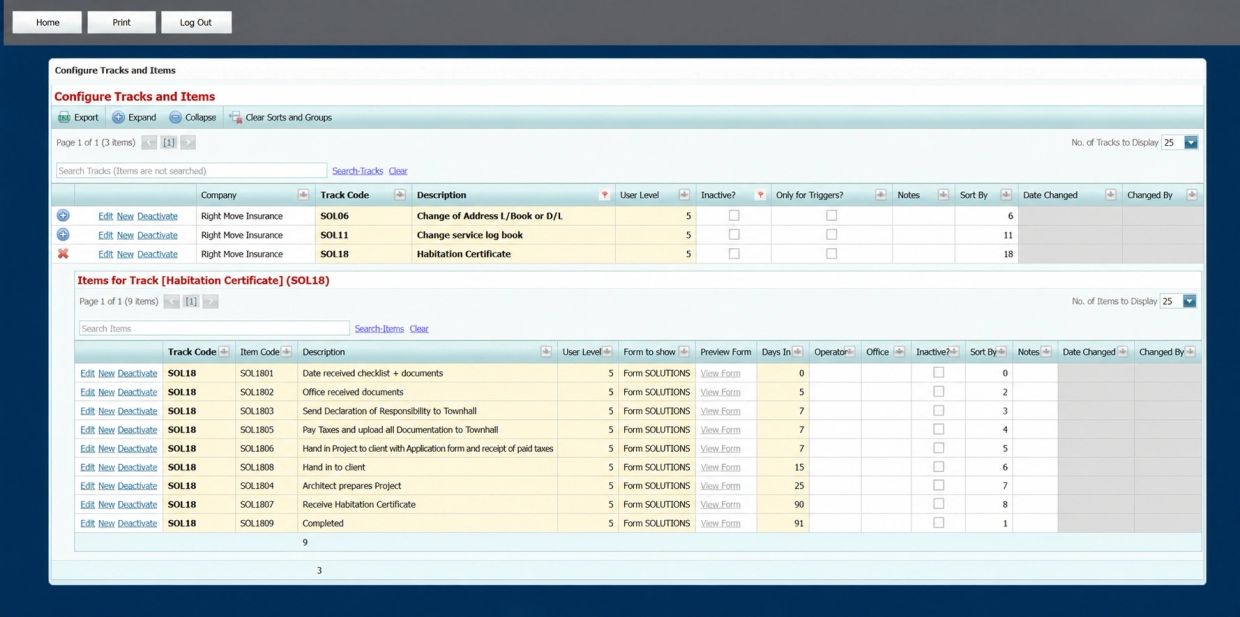
Configure Tracks and Items
Configure workflow processes within MS Flex
MS Flex Insurance Brokerage Software delivers instant access to all client, policy, and claims information through a single, intuitive interface, making it one of the leading client management solutions in the industry.
View both active and inactive policies, track claims, manage renewals, and access supporting documentation without the need to switch screens.
- Centralised client records
- Efficient policy and claims management
- Advanced search capabilities
- Built-in filters and grouping
- Real-time portfolio visibility
Powerful search and filtering tools within our insurance brokerage software allow users to locate clients, policies, and claims quickly and accurately. This translates to less time searching and more time servicing.
- Sophisticated client searches
- Dynamic filtering and sorting
- Active and inactive policy views
- Claims tracking and management
- Instant access to related documents and communications
Your Entire Book of Business at Your Fingertips
MS Flex provides brokers with a complete view of every client relationship, encompassing active policies, claims, as well as historical records, communications, and documents, all through an integrated policy management system.
Advanced search tools and intelligent filters help users uncover exactly what they need, right when they need it.
Tailored for busy insurance professionals, MS Flex combines client management, policy administration, and claims tracking within a single, integrated platform. Users can conduct sophisticated searches across thousands of records, utilise built-in filters to refine results instantly, and access all related information from one central location.
Whether you're managing renewals, servicing clients, or reviewing claims activity, the information you need is always just a few clicks away.
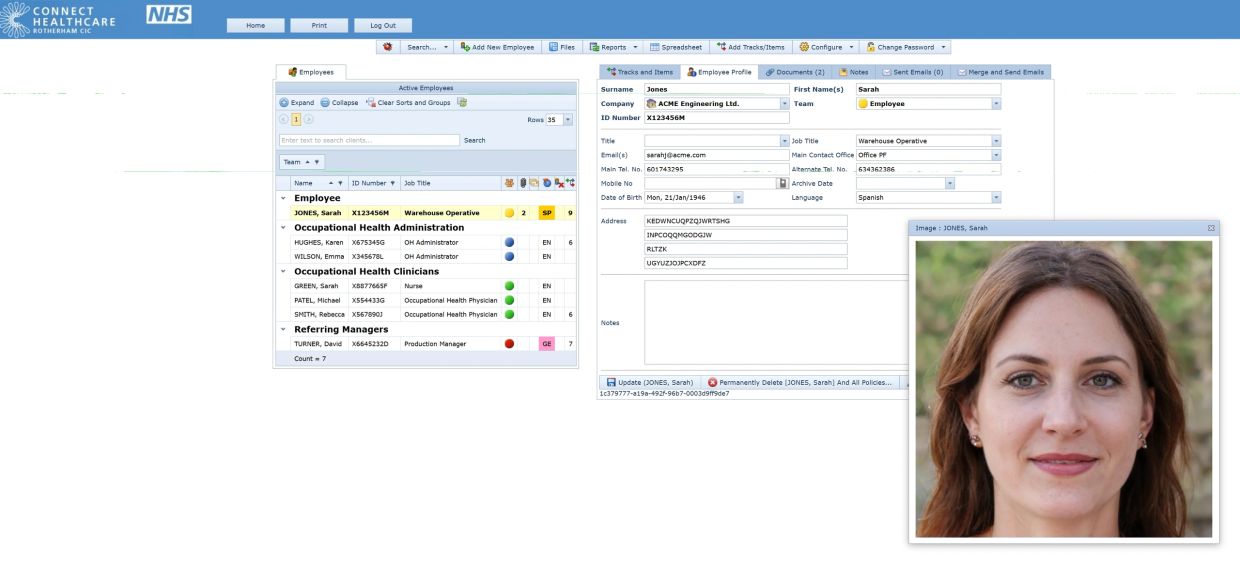
Example : Configured For Occupational Health Referrals
The screenshot above illustrates one of the strengths of MS Flex.
The underlying platform remains the same, but screens, terminology, workflows, forms and security have been configured specifically for Occupational Health. Employee records, referrals, clinical assessments and management reports are presented in a way that feels natural to Occupational Health teams while retaining the flexibility and audit capabilities of the core MS Flex platform.
My-Flex is more than an Occupational Health record system. It manages the complete referral lifecycle, recording every activity from referral through assessment, reporting, review and closure while maintaining a full audit history throughout.